Connecting The DSI VTL With
Your OS 2200
STAR Library Manager (LIBMGR) enables OS 2200 to use the tape automation services of the DSI Virtual Tape Library (VTL) and the DSI Physical Tape Library (PTL).
Integrate Virtual Tape into Your Operations
LIBMGR ensures that user tape requests intended for the DSI VTL or PTL are directed to those devices. It executes as a background program with an interface for console operations, exhibiting active and ongoing interaction with STAR-1100 and the OS 2200 operating system.
Thus, LIBMGR extends data protection, library management and highly productive tape operations into your virtual tape library and its backup resources. It obtains scratch pool services from STAR-1100 so that users’ scratch pool requests are conveniently fulfilled and also managed from common resources.
Users can stack multiple tape volume Imagery onto a single virtual tape. Later, as needed, they can then unstack a stacked volume onto a physical tape.
Key Capabilities
- Users specify a preferred scratch pool on their volume &ASG ECL
- Scratch tapes are seamlessly integrated with STAR-1100 for robust protection
- Integration with STAR improves comprehensive management of scratch tapes and pools
- Optional integration with physical libraries significantly enhances archival and backup workflows
- Optional tape “Stacking” significantly increases storage density
- Optional “System Unstack” quickly restores archived contents of a stacked tape
- Robust reporting subsystem for clear visibility into resources
- Advanced utilities designed specifically to manage virtual tapes
Flexible Configurations
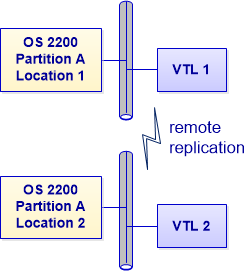
Satisfy your site’s tape storage needs with numerous configuration options. These include handling disaster recovery needs via remote replication.
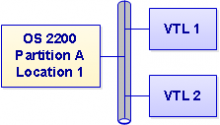
Single partition – multiple VTLs
Simplify management and optimize resources by accessing multiple Virtual Tape Libraries from a single OS 2200 partition.
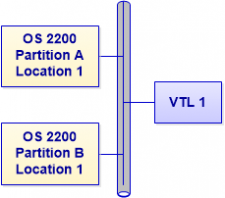
Multiple partitions – single VTL
Maximize hardware utility. The same VTL appliance can be efficiently connected to and shared by more than one OS 2200 partition.
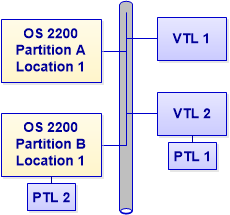
Options for physical libraries
Maintain ultimate flexibility. Optionally, a DSI physical library can be attached to a DSI VTL. Or, the physical library can be directly connected to the OS 2200 partition depending on your architecture.
Remote replication
Satisfy your site’s needs for business continuance and robust disaster recovery by establishing a remote site with its own VTL. Use seamless replication to ensure that tape data is mirrored and secure at both sites.